

Easy MPF (eMPF) Introduction and Application Summary: A Must-Read for Hong Kong Employers
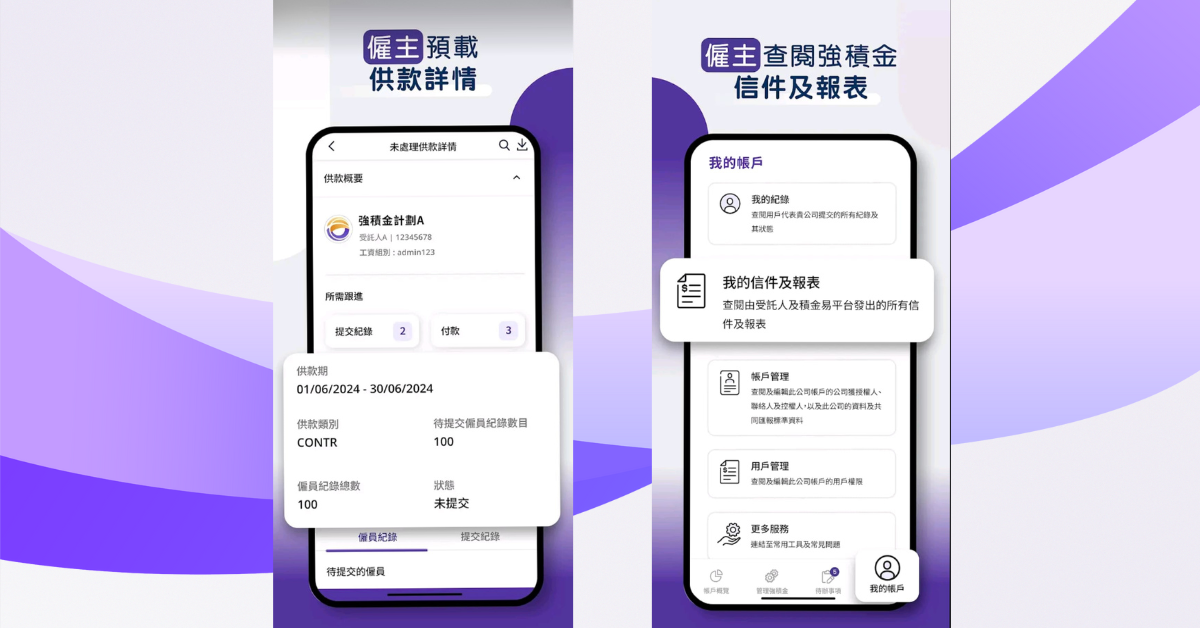
Image source: eMPF website
With the continuous development of Hong Kong's Mandatory Provident Fund (MPF) system, digital management has become an important trend to improve efficiency and convenience. The launch of the eMPF platform provides Hong Kong employers, employees, and self-employed individuals with a comprehensive electronic solution, making MPF management simpler and faster. This article will detail the functions of eMPF and provide a complete step-by-step guide to the application, especially for Hong Kong employers, to help you quickly get started and make full use of this tool
What is Easy MPF?
Developed by a wholly-owned subsidiary of the Mandatory Provident Fund Schemes Authority (MPF), this electronic platform aims to simplify MPF administrative processes and provide a one-stop digital service for 4.7 million scheme members and 360,000 employers. Employers can manage contributions, employee accounts, and check performance anytime through the online platform or mobile application, saving time and increasing efficiency. MPF Easy is completely free and uses advanced encryption technology to ensure the security of your data
What are the benefits for employers using Easily Provident Fund?
As a business owner in Hong Kong, you need to efficiently manage your employees' Mandatory Provident Fund (MPF) contributions and ensure compliance with regulations. eMPF, a tool supported by the MPF Authority, is your ideal assistant. It digitizes cumbersome paper-based processes, making business operations smoother. Here are three key benefits that eMPF brings to employers:
Boost efficiency: Automated payment reminders and submission functions eliminate tedious document processing.
Precision and accuracy: Electronic systems reduce human error and ensure data accuracy.
Easy compliance: Receive advance notice of payment deadlines to avoid penalties for delays.
MPF Easy promotes the digital transformation of MPF management, helping you adapt to future trends in advance and enhance your business competitiveness

Step-by-step guide to downloading and registering the MPF Easy App
To help Hong Kong employers get started quickly, we have compiled a complete step-by-step guide to the Mandatory Provident Fund Easy App. The following steps will guide you through the entire setup process, from downloading to registration
Registering a provident fund account as an employer is easy
Preparation
If your company has received the information package from the trustee, please prepare the "Easy Activation Code" inside the package to expedite the registration process
Prepare the necessary supporting documents, such as a business registration certificate, company incorporation certificate, and a form appointing an authorized representative for the company
Download the Easily Accessible Transaction App
Search for "Jackpot Easy" on the App Store, Google Play, or Huawei App Marketplace and download the app
Start registering
Open the MPP EasyMoney application
Click "Register/Log in" and select "Employer"
After reading the announcement, click "Continue"
Verify identity
Choose one of the following methods:
a. SmartConvenience App: Log in to the SmartConvenience mobile app and follow the on-screen instructions to complete identity verification.
b. Electronic Identity Verification:Click "Start Scan" and select your identification document (such as a Hong Kong identity card)
Once completed, hold the phone vertically at eye level for facial recognition
Follow the instructions (such as blinking) to complete the verification
Confirm profile
After confirming that your personal information is correct, click "Next"
Enter company and licensor information
Enter the company's authorized representative, contact person information, and contact details
Choose to receive a one-time password (OTP) via email or mobile phone, and enter the received verification code
Provide company identification information
Enter the “Easy Activation Code” (see the message packet sent by the trustee)
If no activation code is available, company information must be entered manually
If you have already entered the activation code, you can skip to the next step
Upload the required files
Upload the file displayed on the screen (such as a business registration certificate)
Verify and confirm the submitted information, then click "Submit"
Acceptance of Terms and Conditions
Read the terms and conditions carefully and click "Accept" to submit your registration application
Registration Confirmation
After successful submission, you will receive a confirmation notification via email or SMS within approximately two business days
How to activate EasyCard (after successful registration)
Receive startup notification
Once your registration is approved, you will receive an email or SMS confirmation notification
Start
Open the MPP EasyMoney application
On the login page, select "Employers" and click "Activate your CPF Easy"
Click "Start Now"
Enter identity information
Enter your identification number and registered email address or mobile phone number
Click "Send One-Time Password" and enter the received verification code
Create login credentials
Set your Livs.com username and password
Click "OK" to complete the startup
Start using EasyJack
After logging in, you can use electronic services such as registering for MPF schemes, registering employee schemes, and processing contributions
How to log in to the Housing Provident Fund Easy Account as an employer?
Download or open the application
Scan the QR code or download the CoinEasy app from the App Store, Google Play, or Huawei App Marketplace
Open the application and click "Register/Log in"
Choose login method
Open the application and click "Register/Log in"
Select "Employer", then choose one of the following login methods:
a. Username and password:Enter your MPF Easy Username and password
Receive a one-time password to your registered email or mobile phone, and enter the verification code.
b. Biometric authentication:If already enabled, you can log in using fingerprint or facial recognition.
c. "Smart Convenience":Log in through the "Smart Convenience" app and follow the on-screen instructions to complete the process
Configure biometric login (first login)
If this is your first time logging in, you can enable the biometric authentication function:
Follow the on-screen instructions to add your mobile device to the list of trusted devices
Once you have set up biometric login, you can use this feature to log in

How to retrieve my Housing Provident Fund Easy Username
Enter recovery options
On the EasyLogin page for MPF, click "Forgot Username"
Verify identity
Choose one of the following methods:
a. SmartConvenience: Log in to the SmartConvenience app and follow the instructions to complete the verification.
b. Two-factor authentication:Enter your name in Chinese and English, date of birth, ID number, and registered email or mobile phone number
Click "Send One-Time Password" and enter the received verification code
Retrieve Username
The screen will display your username; use it to log in to the Jijinyi platform
How to reset your Housing Provident Fund Easy Login Password
Enter recovery options
On the CPF Easy Login page, click "Forgot Password"
Verify identity
Choose one of the following methods:
a. SmartConvenience: Log in to the SmartConvenience app and follow the instructions to complete the verification.
b. Two-factor authentication:Enter your name in Chinese and English, date of birth, ID number, and registered email or mobile phone number
Click "Send One-Time Password" and enter the received verification code
Reset Password
Set a new password and click "OK"
Log in to the JJE platform using your new password
Mandatory Provident Fund (MPF) Management for Employees: Commonly Used Functions
After completing registration, you can manage your employees' Mandatory Provident Fund (MPF) affairs. Here are some commonly used functions:
1. Submit contribution
In the "Employer Area", select "Submit Contribution", choose the contribution type (employer/voluntary), enter the employee amount and frequency, scan and upload the paper settlement statement (if any), select the payment method, confirm and submit to obtain the transaction number, check the status in "Transaction History", and you will receive a reminder 2 business days before the contribution
2. Check account status
Click "Account Overview" to check employee account balance, investment performance, total balance, contributions and returns, view fund allocation, view contribution, income and expense records, download PDF reports, confirm contribution deposit (takes several days), check fund value, growth rate and abnormal alerts
3. Update data
Add/remove employee accounts in "Personal Data" or "Employee Management", update address/contact information (verification code required), change beneficiary and submit proof, upload clear proof documents, save and check the new data
4: View notification
View system notifications (payment reminders, policy updates), and review past payment records and application status
Frequently Asked Questions
Does the CPF Easy app require any additional fees?
The CPF Easy app is completely free, but data transfer fees may be incurred during use. It is recommended to use it in a Wi-Fi environment.How to ensure data security?
Easily Secured uses advanced encryption technology and regularly updates its security measures. Business owners should avoid using it on public networks and change their passwords regularly.
In conclusion: Easy-to-use funds make business management easier
eMPF is the ideal tool for Hong Kong employers to manage their Mandatory Provident Fund (MPF) accounts, digitizing cumbersome processes to improve efficiency, accuracy, and compliance. Through this free application, business owners can easily manage contributions and accounts, adapting to the digital age. Download and register now to make eMPF your best business assistant and enhance your competitiveness!